
Download Web Archives Viewer – Web Archives, Compressed Files, Zip Preview, Rar Preview, Secure Browsing, Internet Explorer Plug-in
Overview
Web Archives Viewer is a specialized utility designed for users of Internet Explorer who prioritize online safety and content transparency. As a browser plug-in, it enables users to inspect the contents of ZIP and RAR archives directly within the browser environment, eliminating the need to download potentially harmful files. This functionality addresses a critical concern in digital browsing: the risk of inadvertently downloading malware or unwanted content hidden within compressed files. By providing a secure preview mechanism, Web Archives Viewer empowers users to make informed decisions before committing to a download.
The app is specifically tailored for individuals who frequently encounter compressed file downloads, such as software developers, researchers, or professionals handling digital assets. Its primary value lies in enhancing security by allowing real-time file inspection. For example, a user downloading a software package can verify that the archive contains only legitimate installation files, without exposing their system to potential threats. This is particularly relevant in environments where file integrity and security are paramount.
Although the developer did not provide additional background information, the app’s purpose is clearly defined and focused. It operates as a niche tool within the broader productivity and security ecosystem, filling a gap left by Internet Explorer’s native capabilities. Despite its age, the tool remains relevant for users still relying on legacy systems or environments where modern browsers are not an option. Its continued presence underscores the ongoing need for secure, lightweight utilities in digital workflows.
Key Features & Functionality
- Preview Compressed Files: Users can view the internal structure of ZIP and RAR archives directly in the browser without downloading them. This feature reduces exposure to malicious content by allowing visual verification of file contents before any action.
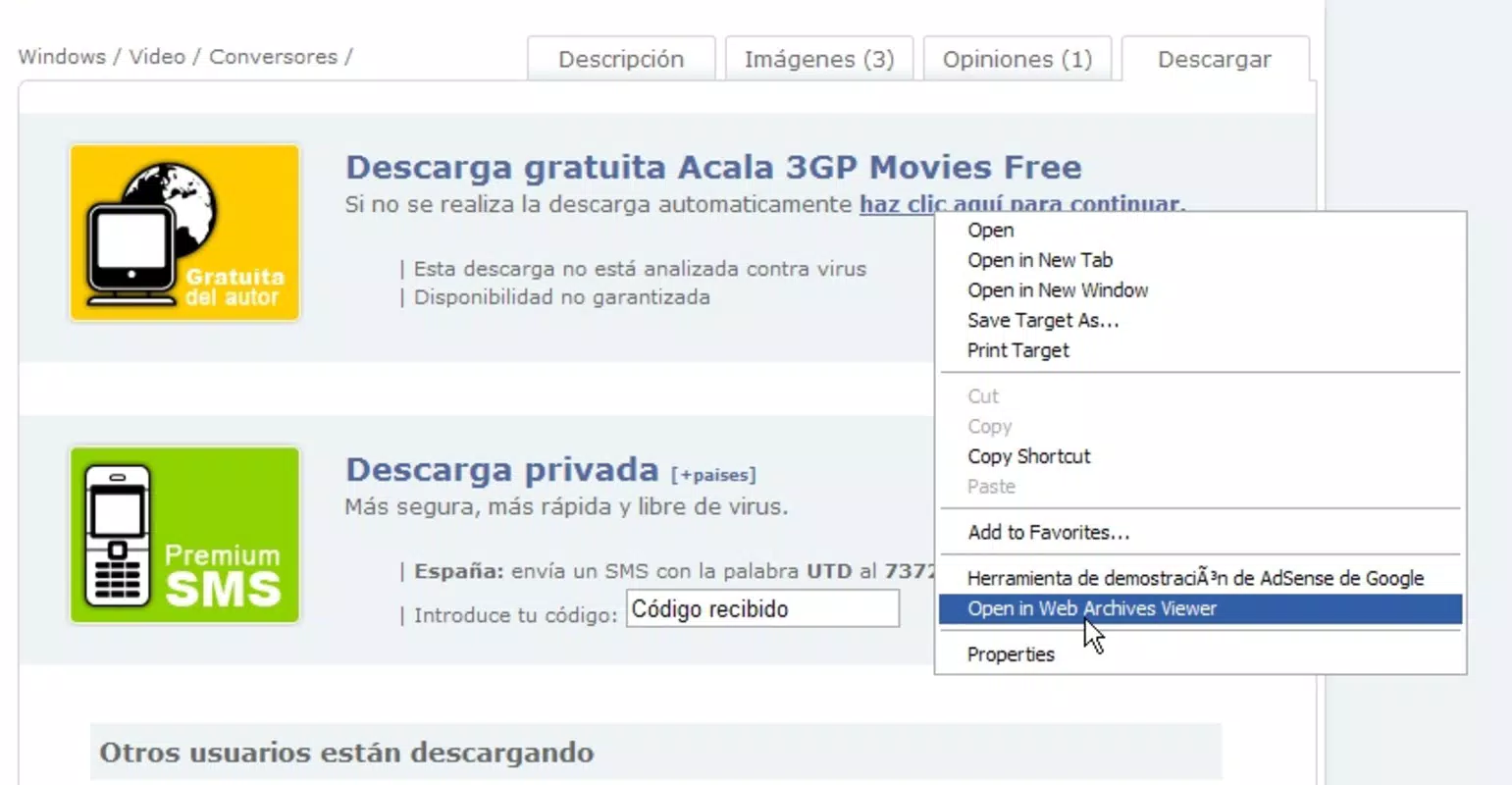
- Contextual Menu Integration: The plug-in adds a dedicated option to the right-click menu. By selecting ‘Open in Web Archive Viewer,’ users can instantly access the preview function with minimal steps, improving workflow efficiency.
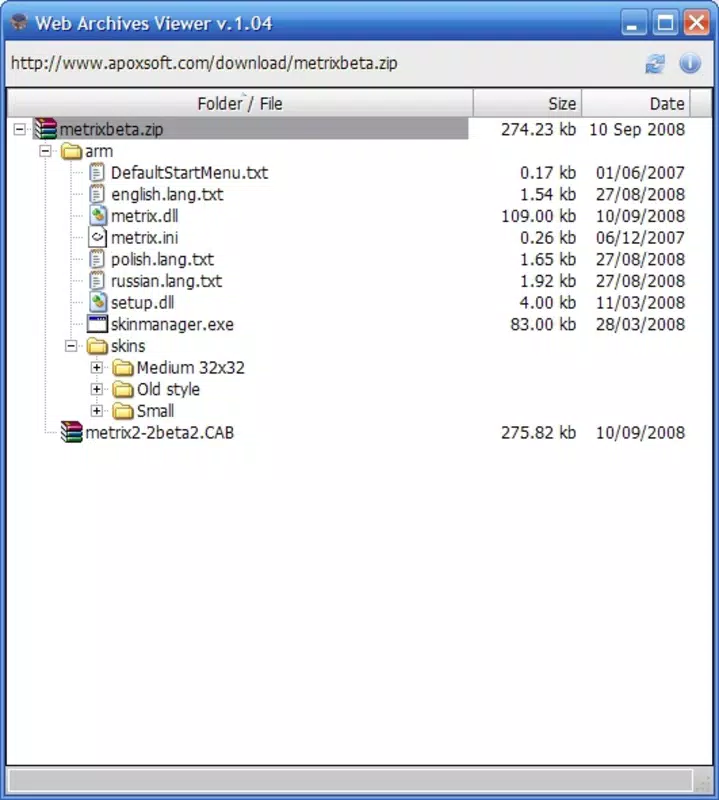
- Organized File Navigation: The interface supports hierarchical file browsing, allowing users to expand and collapse folders. This feature enhances readability and makes it easier to locate specific files within complex archive structures.
- Secure Download Decisions: By enabling pre-download inspection, the tool helps users avoid downloading harmful or irrelevant files. This is especially useful when dealing with untrusted sources or unknown file origins.
- Compatibility with Internet Explorer: Designed specifically for Internet Explorer, the plug-in ensures seamless integration with the browser’s architecture, offering a stable and predictable experience for users of this platform.
For instance, a user downloading a ZIP file from a third-party website can right-click the link, select the plug-in option, and immediately view the file list. If the archive contains executable files or suspicious extensions, the user can choose not to proceed, thereby reducing the risk of malware infection. This workflow demonstrates how the tool transforms passive downloading into an active, informed decision-making process.
Interface, UX & Performance
The interface of Web Archives Viewer is designed with simplicity and functionality in mind. It presents a clean, text-based file list with folder icons and expandable nodes, allowing users to navigate through archive contents with ease. The visual style is minimalistic, focusing on clarity rather than graphical embellishments, which aligns with its utility-driven purpose. Navigation is intuitive—users can click to expand folders and view nested files, making it straightforward to locate specific items.
Although the developer did not list formal performance metrics, the app’s lightweight nature (2.1 MB) suggests efficient resource usage. It is likely optimized for quick loading and minimal system impact, which is essential for a plug-in operating within a browser environment. The responsiveness of the interface appears to be consistent, given its straightforward interaction model. Users can expect immediate feedback when expanding folders or selecting files.
Stability is likely maintained through its narrow scope and compatibility with a single browser. However, performance on different device categories—such as older systems or low-memory configurations—was not specified. The app may function reliably on systems running Internet Explorer, but no formal testing data was provided. Overall, the user experience prioritizes utility over aesthetics, making it suitable for users who value functionality and security over visual polish.
Platform Compatibility & Technical Requirements
Web Archives Viewer is designed exclusively for the Windows operating system and requires Internet Explorer to function. The app is compatible with the version of Internet Explorer available at the time of its release in 2008, though specific OS versions were not listed. The file size is 2.1 MB, which is relatively small and suggests minimal storage impact.
The developer did not specify minimum OS requirements or compatibility with modern Windows versions. As such, users should exercise caution when attempting to install the app on newer systems, as legacy plug-ins may not function due to security restrictions or lack of support. It is recommended for use on older Windows environments where Internet Explorer remains operational.
Pros and Cons
- Enables safe preview of ZIP and RAR files without downloading
- Integrates seamlessly with Internet Explorer’s right-click menu
- Provides organized, hierarchical file navigation
- Lightweight at 2.1 MB, minimal system impact
- Free to download and use
- Only compatible with Internet Explorer, limiting modern usability
- Released in 2008, may lack support for newer archive formats
- Not available for macOS or mobile platforms
- Developer did not provide technical specifications or update history
- May not function on current Windows versions due to security policies
FAQ
Is Web Archives Viewer safe to install?
Yes, the app is free and designed to enhance browsing security. However, as a legacy plug-in, it may not be supported on modern Windows systems due to security restrictions.
Can I use Web Archives Viewer on Windows 10 or 11?
Compatibility with Windows 10 or 11 is not guaranteed. The app was released in 2008 and may not function properly due to changes in browser architecture and security policies.
Does Web Archives Viewer support formats other than ZIP and RAR?
The provided information specifies support for ZIP and RAR files only. No details were given about additional archive formats.
Is Web Archives Viewer available for macOS or mobile devices?
No, the app is designed exclusively for Windows and Internet Explorer. It is not available for macOS, iOS, or Android platforms.
How do I update Web Archives Viewer?
The developer did not provide update information. As a legacy tool, it may not receive future updates.
Final Thoughts
Web Archives Viewer stands as a niche yet purposeful tool for users still relying on Internet Explorer. Its ability to preview compressed files without downloading offers a meaningful layer of security in an era where digital threats are increasingly sophisticated. While its age and platform limitations restrict its broader appeal, it remains a valuable asset for specific workflows involving legacy systems or environments where file safety is a top concern.
For professionals handling digital downloads on older Windows setups, this plug-in provides a practical solution to a persistent problem. Its lightweight design, free access, and straightforward functionality make it a reliable choice for those who prioritize control and transparency in their browsing habits.
Download Web Archives Viewer now


